

How it works: From helpful to harmful
Calendar subscriptions were designed to make life easier. By subscribing to an external calendar listing national holidays, sports schedules, or promotional events, your device establishes an automatic connection to the server hosting that calendar. This connection allows your calendar app to fetch updates in the background, ensuring your schedule is always current without requiring user intervention. However, this same connection can become a point of vulnerability, remaining active even after the original domain becomes inactive or dubious.
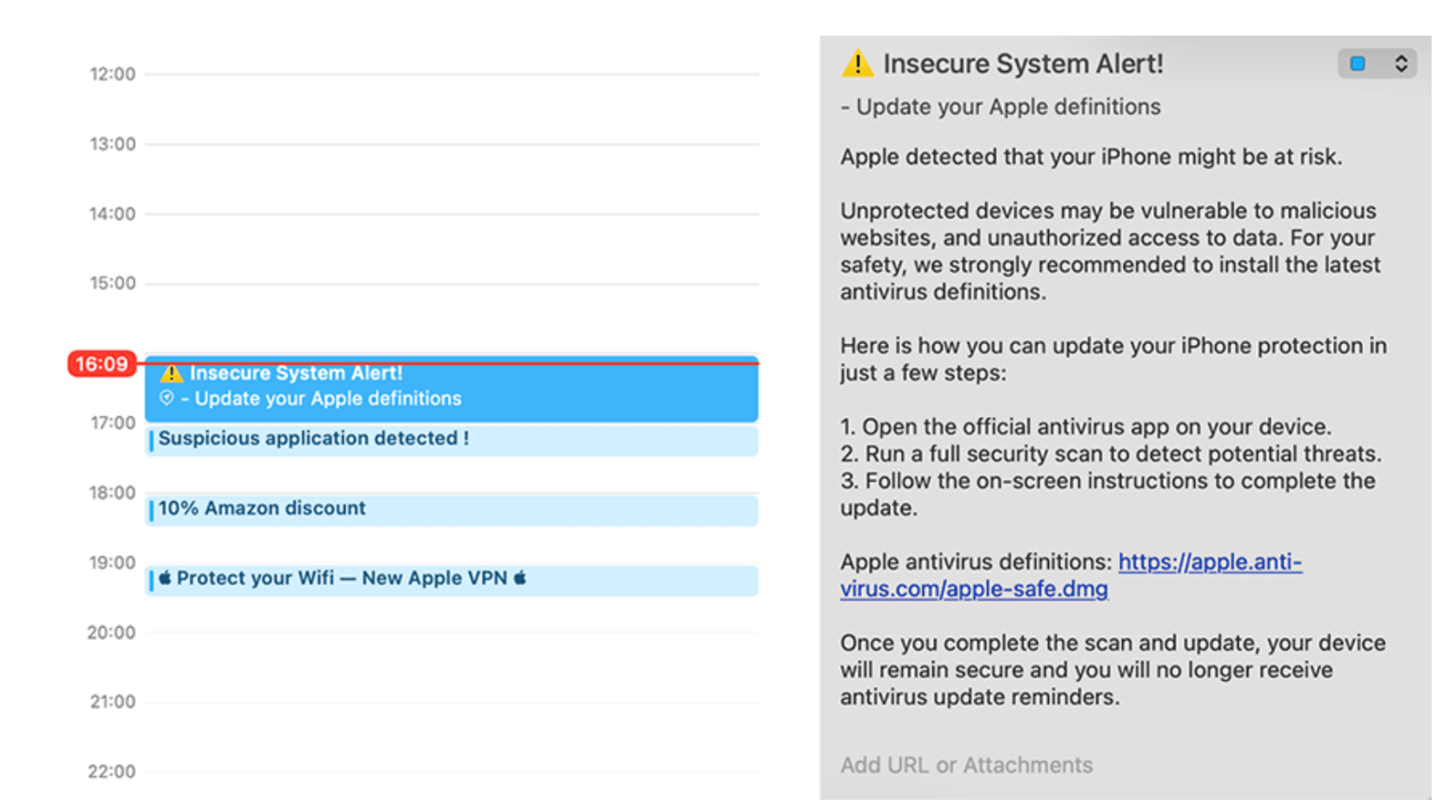
When a domain that once hosted a calendar subscription expires, it becomes available for purchase. Threat actors can easily re-register these domains and respond to the sync requests still being made by consumers’ devices. Each request typically looks for a calendar file in the form of an .ics file, which contains event data: titles, times, and descriptions. Attackers can exploit this by sending back malicious .ics files that masquerade as normal events, concealing harmful content.
These malicious calendar events can include:
- Links to phishing pages disguised as legitimate promotions or meetings, such as “Black Friday Sale! Tap here.”
- Malicious attachments like fake invoices or those claiming to be essential downloads that can install unwanted software.
- Redirects to scam apps or push notifications that inundate users with alerts or prompt them to install additional malware.
The calendar protocols on some devices do not use a proxy, leading to a direct connection between devices and the calendar server. Unlike Google Calendar, which employs a proxy-based design to limit direct access, this setup gives attackers heightened visibility and control. Therefore, if they succeed in hijacking a domain that users’ devices continue to query, attackers can not only push new calendar events but also exploit the ongoing traffic for phishing, tracking, or additional malicious activities.
What begins as a useful productivity feature can easily morph into a persistent and trusted attack vector. Users typically see nothing unusual; their devices simply continue synchronizing while attackers gain an unobstructed line of communication via the native calendar app.
Why this matters: The exploitation of trust
Calendar events are inherently trusted. They appear within a native application, not in dubious emails, and seamlessly blend with legitimate reminders or meeting invites. Users often encounter “reminders,” “deals,” or “event invites,” making it easy to overlook warning signs. Busy professionals rarely pause to verify the sender of an invite before accepting or participating. This ingrained trust bestows calendar events with a psychological edge that traditional phishing campaigns lack.
Even legitimate calendar domains can be weaponized after expiration. Research has shown that threat actors manipulate expired calendars, repurposing them to gain access to environments, conduct reconnaissance, collect data, and carry out complex phishing exploits. Once a subscription is active, devices continue syncing automatically, which allows attackers to reach a massive number of devices in a single strike.
Unlike phishing emails, calendar invites do not sink into spam folders; they arrive directly on your phone as trusted notifications, often prompting users to click with little hesitation.
Real-world scenarios
Malicious calendar events are often crafted to appear enticing or urgent, nudging users to click without a second thought. Attackers could present events labeled “Exclusive Apple Store Deal” or “Amazon Sale” that lead directly to phishing sites targeting sensitive credentials or payment information. In other instances, threat actors may use vague or seemingly innocuous calendar titles, hiding malicious content within the event descriptions—a strategy that has been highlighted in several research findings. By exploiting users’ intent to maintain security, some events push fake VPN applications or display fabricated system alerts pressing for immediate action. These malevolent reminders camouflaged as legitimate notifications make it increasingly difficult for users to differentiate between trustworthy events and harmful intrusions.
What device users can do
- Check your subscribed calendars
Navigate to Settings → Calendar → Accounts → Subscribed Calendars. Review your list and remove any subscriptions you do not recognize or no longer utilize. - Be skeptical of “free” event calendars
Steer clear of adding calendars from unknown websites or applications promoting deals, promotions, or countdowns, as these are often routes for delivering malicious or unwanted events. - Treat calendar events like emails
Avoid clicking links or opening attachments from unfamiliar or unexpected calendar events. If you notice anything unusual, either delete the event or unsubscribe from its source. - Update OS regularly
Keep your device software updated. Companies like Apple continually enhance protections, complicating attackers’ efforts to exploit calendar syncing. - Stay informed
Be aware that your training should include calendar-based threats, as cybercriminals are broadening their reach beyond email phishing to utilize calendars as the next frontier for social engineering.
Convenience vs. control
The same tools that assist in keeping us organized can also be weaponized against us. Research from Bitsight demonstrates that overlooked calendar subscriptions can silently link countless devices to abandoned or compromised infrastructures. If left unchecked, these trusted tools may become potent entry points for phishing, scams, and other forms of malicious activity. Awareness is your first line of defense: frequently review your subscriptions, eliminate unfamiliar calendars, and remain vigilant toward unexpected events or notifications. Not every alert on your device merits your trust or a space on your agenda.
Bitsight’s Insecure Systems risk vector examines endpoints—any computer, server, device, system, or appliance with internet access—that are communicating with unintended destinations. An endpoint is labelled “insecure” when it tries to communicate with a web domain that either doesn’t exist or isn’t registered by someone. Bitsight helps reveal where trusted assets might have unintentionally slipped into risky territory by identifying endpoints still reaching out to unregistered or expired infrastructures. Get in touch with our team to learn more.


