AVG Internet Security for Mac: A Comprehensive Review
AVG Internet Security for Mac is a robust antivirus solution designed specifically for macOS users, offering an array of features aimed at enhancing security and performance. Below is a rundown of its strengths and weaknesses, along with insights into its pricing and essential functionalities.
At a Glance
The AVG Internet Security suite stands out for its strong antivirus and anti-malware capabilities. It’s designed for users seeking comprehensive protection for their Macs without compromising too much on performance. However, potential users should consider both the advantages and limitations before making a decision.
Expert’s Rating
AVG Internet Security for Mac may not be the gold standard in cybersecurity, but it packs a punch with its various features. The effectiveness of its built-in tools enhances not just virus protection but also general system security, presenting a worthy option for the everyday user.
Pros of AVG Internet Security for Mac
-
Strong Antivirus and Anti-Malware Protection: AVG excels in malware detection, providing a strong defense against both known and emerging threats.
-
Speedy Performance with Customization Options: Users can customize features, including the creation of whitelist files, and benefit from quick system scans without noticeable lag.
- Network Inspector and Ransomware Shield: The addition of a Network Inspector helps monitor devices connected to your network, while the Ransomware Shield adds an extra security layer, protecting crucial folders from unauthorized encryption.
Cons of AVG Internet Security for Mac
-
Underwhelming Anti-Phishing Protections: While AVG catches some phishing attempts, its performance in this area is inconsistent, making it less reliable for users who frequently navigate online.
-
Occasional Malware Removal Hiccups: Users have reported sporadic issues when attempting to remove detected malware, which can be frustrating, especially during urgent situations.
- Paid Features Aren’t a Major Upgrade: Many find that the paid version’s features enhance security only marginally compared to the free version, leading some to question the need for a subscription.
Pricing Overview
When it comes to pricing, AVG Internet Security for Mac offers competitive rates. The subscription options include:
- $3.89 a month for a single Mac (totaling $46.68 for the first year, then $77.99 annually).
- $4.99 a month for up to 10 devices (totaling $59.88 in the first year, rising to $99.99 thereafter).
This pricing structure raises questions about whether the advanced features justify the cost, especially for existing users of AVG’s free version.
Comparing Free vs. Paid Versions
After previously testing AVG AntiVirus Free for Mac, it’s important to note that AVG Internet Security requires macOS 10.13 (High Sierra) or later, ensuring compatibility for most users. The installation process is seamless and straightforward, requesting necessary access to your Mac’s disk for optimal operation.
The paid version expands upon the core features of the free version by incorporating additional protections for hackers and payment safeguards. Particularly, its antivirus capabilities remain equally effective, and it integrates smoothly with macOS’s built-in security features.
Key Modules
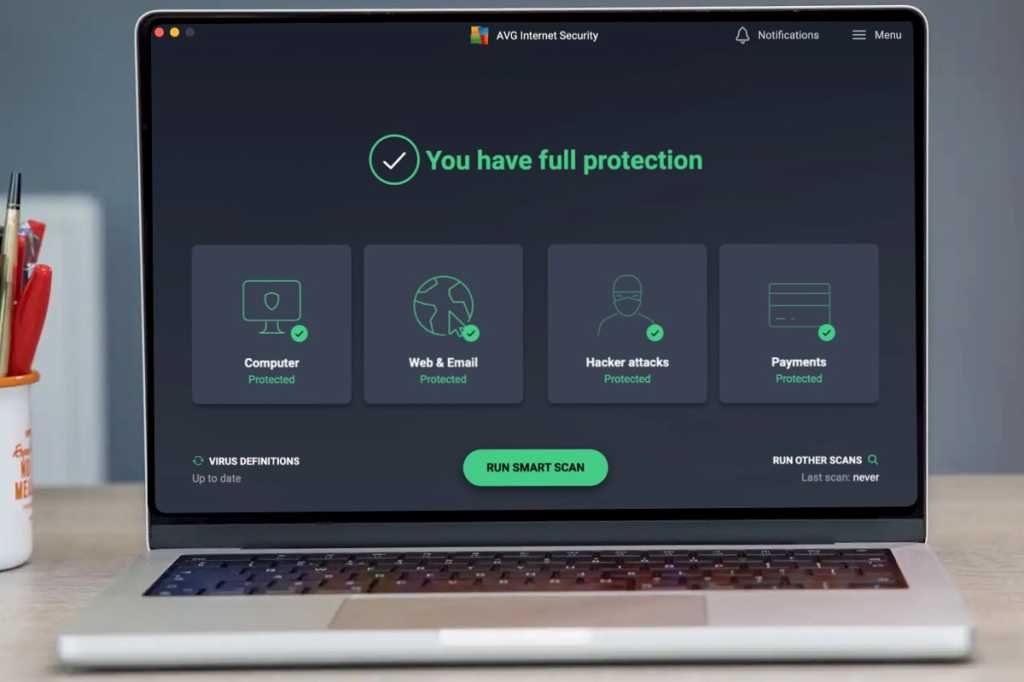
AVG Internet Security’s functionality is organized into four main modules:
- Computer Protection: Core antivirus and anti-malware functions.
- Web & Email Protection: Guard against malicious websites and email threats.
- Hacker Attacks Protection: Network Inspector alerts on unauthorized devices.
- Payment Protection: Safeguards against phishing and data theft during online transactions.
User Interface and Usability
AVG Internet Security is known for its user-friendly interface, allowing easy navigation through different scan options: Smart Scan, Deep Scan, Targeted Scan, and External Storage Scan. However, users may find themselves digging through menus to monitor scans once they begin, which could be improved for a more intuitive experience.
Scanning itself is efficient, with quick scans completed in a matter of minutes. Full scans may take longer, particularly on larger drives, but the time invested is generally deemed reasonable given the thoroughness of the protection provided.
Enhanced Security Features
Network Inspector
The Network Inspector is vital for users concerned about network security. It inspects home networks to identify unexpected or unauthorized devices, serving as an excellent first line of defense against potential intrusions.
Ransomware Shield
Another standout feature is the Ransomware Shield, acting as a protective barrier to secure vital documents and folders from ransomware attempts. Users can customize protected folders, which adds a personalized touch to security management.
Payment and Fake Website Protection
AVG’s module for preventing unauthorized payment transactions and phishing attempts offers valuable protections. However, while the software generally provides warnings against suspicious links, gaps in performance can sometimes undermine user confidence.
Conclusion
For those considering AVG Internet Security for Mac, its offerings are compelling, especially if you appreciate its well-rounded antivirus capabilities and additional features. However, assessing whether these enhancements are worth the investment is crucial, as many users may find the free version sufficiently protective for their needs.
Overall, AVG Internet Security provides a solid defense for macOS users, but consideration of its limitations can lead to better-informed decisions regarding whether to upgrade from the free variant. Whether you’re providing extra protection for sensitive data, scanning external drives, or monitoring your network, AVG Internet Security for Mac aims to cover all your bases—albeit with some caveats.