

Software-as-a-Service (SaaS) tools have become the backbone of modern businesses. From managing projects and customer relationships to automating marketing and analyzing data, SaaS platforms allow companies to operate faster, smarter, and more efficiently.
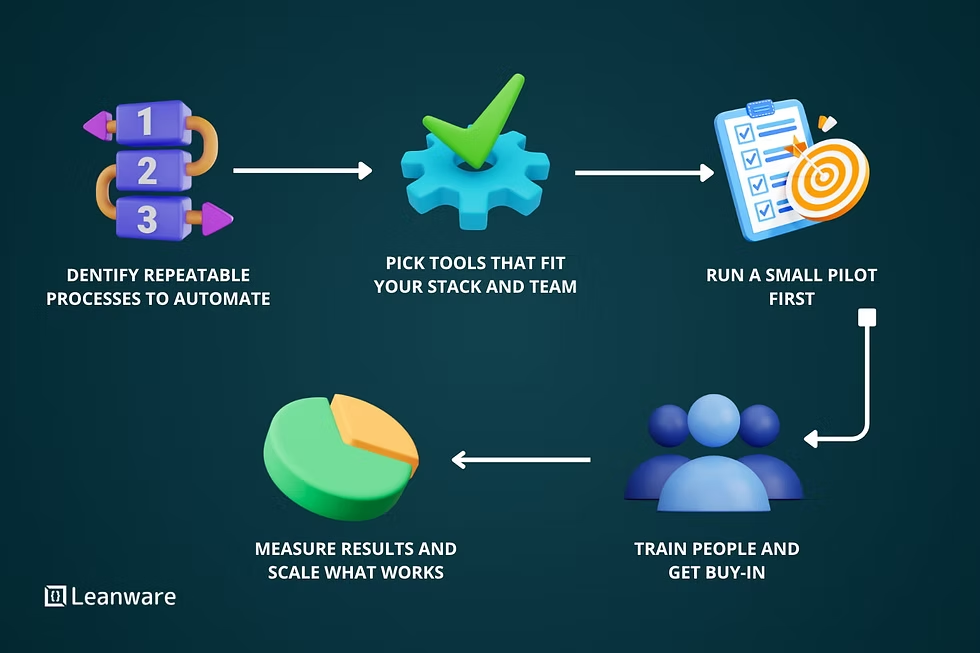
In this tutorial guide, you’ll learn how to choose the right tools, set them up properly, integrate them into workflows, and automate processes for maximum productivity.
What Are SaaS Tools?
SaaS tools are cloud-based applications accessible through a browser or mobile app. Unlike traditional software, they don’t require installation or manual updates.
Examples of SaaS categories include:
- Project management platforms
- CRM systems
- Email marketing tools
- Accounting software
- Automation platforms
- Analytics dashboards
Businesses of all sizes rely on SaaS because it’s scalable, cost-effective, and easy to deploy.
Step 1️⃣ Identify Your Business Needs
Before choosing tools, define your goals.
Ask yourself:
- What processes take too long?
- Where do mistakes occur frequently?
- Which tasks are repetitive?
- What data do you need insights on?
Understanding pain points helps you select tools that actually improve operations rather than adding complexity.
Step 2️⃣ Choose the Right SaaS Stack
Here’s a recommended foundational SaaS stack for most businesses:
📊 Project Management
Use tools like Asana or Trello to organize tasks and team collaboration.
💬 Communication
Platforms such as Slack centralize team communication and reduce email clutter.
📈 CRM (Customer Relationship Management)
CRMs like HubSpot help track leads, sales pipelines, and customer interactions.
📧 Marketing Automation
Email platforms like Mailchimp automate campaigns and analytics.
🔁 Workflow Automation
Automation tools such as Zapier connect apps and automate repetitive tasks.
Step 3️⃣ Set Up Your Tools Properly
Many businesses fail to benefit from SaaS tools because they skip proper setup.
Setup Checklist:
- Configure user permissions
- Customize dashboards
- Import existing data
- Set notification preferences
- Define workflows and pipelines
- Integrate with existing tools
Proper configuration saves hours of manual work later.
Step 4️⃣ Integrate Your SaaS Tools
Integration is where real productivity gains happen.
Example workflow:
Lead form → CRM → Email automation → Project management → Invoice generation
This eliminates manual handoffs and reduces errors.
Step 5️⃣ Automate Repetitive Tasks
Automation is the biggest advantage of SaaS platforms.
Common Business Automations:
- New lead → automatic welcome email
- Payment received → invoice sent → receipt logged
- Task completed → notify manager
- Support ticket submitted → assign to agent
Automation saves time and ensures consistency.
Step 6️⃣ Train Your Team
Even the best tools fail without proper adoption.
Training should include:
- Onboarding sessions
- Workflow demonstrations
- Documentation guides
- Ongoing support
A well-trained team maximizes ROI from SaaS investments.
Step 7️⃣ Monitor Performance & Optimize
After implementation, track metrics such as:
- Time saved per task
- Workflow completion rate
- Customer response time
- Revenue impact
Review performance monthly and adjust settings or integrations as needed.
Best Practices for Managing SaaS Tools
✅ Avoid Tool Overload
Too many platforms create confusion and inefficiency.
✅ Standardize Workflows
Ensure teams follow consistent processes.
✅ Maintain Security
Use strong authentication and access control.
✅ Audit Subscriptions
Cancel unused tools to reduce costs.
Common Mistakes to Avoid
❌ Choosing tools without clear goals
❌ Ignoring integrations
❌ Skipping onboarding training
❌ Overcomplicating workflows
❌ Paying for features you don’t use
Simplicity often leads to higher productivity.
Advanced Tips for Scaling Businesses
Growing companies should consider:
- Centralized data dashboards
- Advanced automation workflows
- API integrations
- AI-powered analytics tools
- Role-based access systems
As businesses scale, SaaS infrastructure should scale with them.
Benefits of Using SaaS Tools
- Lower operational costs
- Faster deployment
- Automatic updates
- Remote accessibility
- Improved collaboration
- Real-time analytics
SaaS tools enable businesses to operate like larger enterprises without needing enterprise budgets.
The Future of SaaS Tools
The next generation of SaaS platforms will include:
- Built-in AI assistants
- Predictive analytics
- Voice-controlled workflows
- Autonomous automation systems
- Hyper-personalized dashboards
SaaS is evolving from software into intelligent business infrastructure.
Final Thoughts
SaaS tools are no longer optional — they are essential for modern business success. When selected strategically, configured properly, and integrated effectively, they can transform productivity, streamline operations, and unlock scalable growth.
The key isn’t using more tools. It’s using the right tools the right way.
SEO FAQs
Q: What are SaaS tools used for?
They help businesses manage tasks, automate workflows, analyze data, and collaborate efficiently.
Q: How many SaaS tools should a business use?
Only as many as needed to solve real operational problems. Quality beats quantity.
Q: Are SaaS tools secure?
Most reputable platforms offer strong security, especially when combined with proper user access controls.
Q: What is the best SaaS tool for beginners?
Project management or CRM tools are often the best starting point.


