Software has become the backbone of modern businesses. Whether you’re a freelancer, startup founder, small business owner, or enterprise executive, the right business tools can improve productivity, streamline operations, enhance customer experiences, and drive long-term growth.
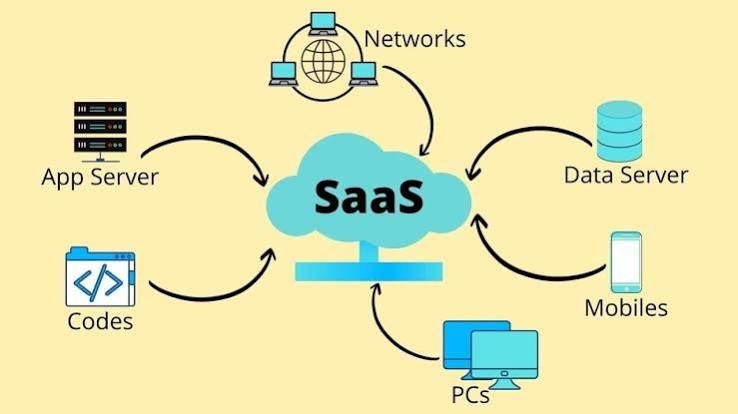
One of the biggest shifts in recent years has been the widespread adoption of Software as a Service (SaaS). Unlike traditional software that requires installation and manual updates, SaaS applications are hosted in the cloud and accessed through a web browser or mobile app. This makes them easier to deploy, more scalable, and often more cost-effective.
Today’s businesses use SaaS solutions for customer relationship management (CRM), accounting, communication, project management, cybersecurity, marketing automation, e-commerce, human resources, artificial intelligence, and much more.
This comprehensive guide explains what Business & SaaS tools are, how they work, the most important categories of business software, how to select the right solutions, implementation best practices, common mistakes, and future trends.
What Are Business & SaaS Tools?
Business tools are software applications that help organizations manage operations, improve efficiency, and achieve business objectives.
SaaS (Software as a Service) tools are cloud-based applications delivered over the internet through a subscription model. Instead of installing software on individual computers, users simply sign in through a browser or mobile application.
Examples include:
- Customer Relationship Management (CRM)
- Accounting software
- Project management platforms
- Team collaboration tools
- Marketing automation software
- Customer support systems
- HR management software
- AI productivity tools
- Cloud storage platforms
- Website builders
Why SaaS Has Become the Standard
Businesses increasingly prefer SaaS because it offers:
- Lower upfront costs
- Automatic updates
- Cloud accessibility
- Easy collaboration
- Flexible pricing
- Faster deployment
- Improved scalability
- Strong integration capabilities
These advantages make SaaS suitable for businesses of all sizes.
Benefits of Business & SaaS Tools
Implementing the right software can provide several advantages.
Increased Productivity
Automation reduces repetitive work, allowing employees to focus on higher-value activities.
Better Collaboration
Cloud-based tools enable teams to collaborate from anywhere while sharing files, messages, and project updates in real time.
Improved Decision-Making
Dashboards and analytics provide insights into business performance, customer behavior, and operational efficiency.
Cost Savings
Subscription pricing and reduced infrastructure requirements often lower overall technology costs.
Business Scalability
Organizations can add users, storage, and features as they grow without replacing their entire software stack.
Customer Relationship Management (CRM)
A CRM system helps businesses manage customer interactions throughout the sales lifecycle.
Key features include:
- Contact management
- Lead tracking
- Sales pipelines
- Opportunity management
- Customer communication history
- Task automation
- Reporting and analytics
Benefits:
- Better customer relationships
- Improved sales forecasting
- Higher conversion rates
- Enhanced customer service
Project Management Tools
Project management software helps teams organize work efficiently.
Common features:
- Task assignment
- Due dates
- Kanban boards
- Gantt charts
- Time tracking
- Team collaboration
- Progress reporting
These tools improve project visibility and accountability.
Communication & Collaboration Tools
Modern businesses rely on cloud communication platforms.
Capabilities often include:
- Instant messaging
- Video meetings
- File sharing
- Team channels
- Calendar integration
- Screen sharing
- Document collaboration
Effective communication improves teamwork and reduces delays.
Accounting & Finance Software
Financial management tools simplify business operations.
Typical features:
- Invoicing
- Expense tracking
- Payroll
- Financial reporting
- Tax preparation
- Budget management
- Cash flow analysis
Automation reduces manual bookkeeping and improves financial accuracy.
Marketing Automation Platforms
Marketing software helps businesses attract and retain customers.
Functions include:
- Email marketing
- Customer segmentation
- Campaign management
- Landing pages
- Lead nurturing
- Analytics
- Social media scheduling
Automation enables consistent customer engagement at scale.
Human Resources (HR) Software
HR platforms simplify employee management.
Features often include:
- Recruitment
- Applicant tracking
- Employee onboarding
- Leave management
- Performance reviews
- Payroll integration
- Learning management
These systems improve HR efficiency while supporting employee development.
Customer Support Software
Customer service platforms help organizations deliver better support.
Capabilities include:
- Help desk management
- Live chat
- Knowledge bases
- Ticket tracking
- Customer feedback
- Automation
- Self-service portals
Fast, organized support contributes to higher customer satisfaction.
Cloud Storage & File Management
Cloud storage enables secure access to files from multiple devices.
Advantages include:
- Automatic backups
- File synchronization
- Version history
- Collaboration
- Permission management
- Disaster recovery support
Cloud storage reduces dependence on local hardware.
Website & E-commerce Platforms
Businesses use cloud platforms to build websites and online stores.
Features may include:
- Website builders
- Product management
- Payment processing
- Inventory management
- SEO tools
- Analytics
- Mobile optimization
These platforms allow organizations to establish and grow their online presence.
AI-Powered Business Tools
Artificial intelligence is transforming SaaS applications.
AI capabilities include:
- Content generation
- Customer support assistants
- Predictive analytics
- Workflow automation
- Sales forecasting
- Meeting summaries
- Intelligent search
- Document analysis
AI helps businesses automate repetitive tasks while improving decision-making.
Business Intelligence (BI) Tools
Business intelligence software converts data into actionable insights.
Typical capabilities:
- Dashboards
- Data visualization
- Trend analysis
- KPI tracking
- Forecasting
- Interactive reporting
Organizations use BI tools to support strategic planning and operational improvements.
Cybersecurity Tools
Every business should invest in cybersecurity.
Essential software categories include:
- Endpoint protection
- Password managers
- Multi-factor authentication
- Email security
- Backup solutions
- Network monitoring
- Vulnerability scanning
Security should be considered when selecting any SaaS platform.
Choosing the Right SaaS Tool
Before adopting new software, evaluate:
Business Needs
Clearly define the problems the software should solve.
Ease of Use
User-friendly software encourages faster adoption and reduces training costs.
Integration
Ensure compatibility with existing systems such as CRM, accounting, and communication platforms.
Scalability
Choose solutions that can grow alongside your business.
Security
Review encryption, authentication, compliance certifications, and vendor security practices.
Pricing
Compare subscription plans, licensing models, feature availability, and total cost of ownership.
Implementing SaaS Successfully
Successful implementation typically follows these steps:
- Define business goals.
- Identify stakeholders.
- Select the appropriate platform.
- Migrate existing data.
- Configure workflows.
- Train employees.
- Test functionality.
- Launch gradually.
- Monitor performance.
- Continuously optimize usage.
Integrating Multiple Business Tools
Many organizations use multiple SaaS applications together.
Common integrations include:
- CRM + Email Marketing
- Accounting + Payment Processing
- Project Management + Communication
- HR + Payroll
- Customer Support + CRM
- AI + Knowledge Management
Well-designed integrations reduce duplicate work and improve data consistency.
Measuring SaaS Success
Important performance metrics include:
- User adoption rate
- Active users
- Customer retention
- Workflow completion time
- Employee productivity
- Customer satisfaction
- Return on investment (ROI)
- Software utilization
Regular reviews help maximize value from software investments.
Common Challenges
Businesses may face:
Too Many Tools
Using excessive software can increase costs, complexity, and administrative overhead.
Poor Adoption
Without training and change management, employees may underuse new platforms.
Data Silos
Disconnected systems make it difficult to share information across departments.
Security Risks
Misconfigured permissions and weak authentication increase cybersecurity risks.
Vendor Lock-In
Organizations should plan for data portability and evaluate exit strategies before committing to long-term platforms.
Future Trends in Business & SaaS Tools
Several developments are shaping the future of business software.
AI-First SaaS
Artificial intelligence will increasingly become a built-in capability rather than an optional feature.
Low-Code and No-Code Platforms
More employees will create workflows, automations, and applications without extensive programming knowledge.
Hyperautomation
Businesses will combine AI, robotic process automation (RPA), and workflow software to automate end-to-end processes.
Vertical SaaS
Industry-specific software tailored to sectors such as healthcare, legal services, manufacturing, and education will continue to expand.
Enhanced Security
Future SaaS platforms will place greater emphasis on Zero Trust architecture, identity management, and privacy controls.
Best Practices for Using Business & SaaS Tools
To maximize value:
- Select software based on business goals rather than trends.
- Keep your software stack as simple as practical.
- Train employees thoroughly.
- Enable multi-factor authentication.
- Review permissions regularly.
- Monitor software usage and ROI.
- Integrate systems where appropriate.
- Update processes as business needs evolve.
Business & SaaS Tools Checklist
Before investing in new software:
- ✅ Identify your business requirements.
- ✅ Compare available solutions.
- ✅ Evaluate integration options.
- ✅ Review security and compliance.
- ✅ Calculate total costs.
- ✅ Test usability with a pilot group.
- ✅ Train employees.
- ✅ Monitor adoption.
- ✅ Measure business impact.
- ✅ Continuously optimize workflows.
Conclusion
Business & SaaS tools have transformed the way organizations operate by making powerful software more accessible, scalable, and collaborative than ever before. From CRM and project management to AI-powered automation, accounting, HR, and cybersecurity, cloud-based solutions help businesses streamline operations, improve customer experiences, and support long-term growth.
However, success depends on selecting tools that align with business objectives, integrating them effectively, training employees, and maintaining strong security practices. Rather than adopting every new platform, organizations should focus on building a well-connected software ecosystem that delivers measurable value.
As AI, automation, and cloud technologies continue to evolve, businesses that invest strategically in SaaS tools will be better equipped to remain competitive, agile, and productive in an increasingly digital economy.
Frequently Asked Questions (FAQs)
1. What is SaaS?
Software as a Service (SaaS) is a cloud-based software delivery model where users access applications through the internet instead of installing them locally.
2. What are Business & SaaS tools used for?
They help businesses manage functions such as sales, marketing, accounting, customer service, project management, communication, HR, cybersecurity, and workflow automation.
3. Why do businesses prefer SaaS?
SaaS offers lower upfront costs, automatic updates, remote accessibility, scalability, easier collaboration, and reduced infrastructure management.
4. How do I choose the right SaaS platform?
Consider your business needs, ease of use, integration capabilities, security, scalability, pricing, and long-term support before making a decision.
5. What is the future of Business & SaaS tools?
The future includes AI-first applications, hyperautomation, low-code development, stronger cybersecurity, industry-specific SaaS solutions, and more intelligent business analytics.