

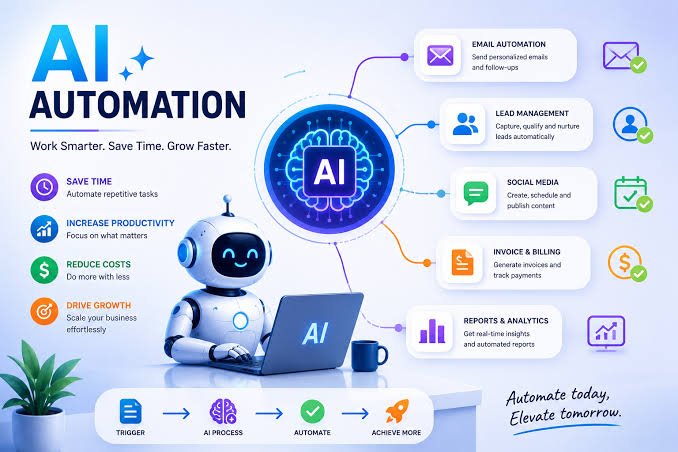
Artificial intelligence and automation are changing the way individuals and businesses work. Tasks that once required hours of manual effort can now be completed faster with AI-powered software, workflow automation, and connected digital tools.
From automatically organizing customer leads to generating reports, responding to messages, processing documents, and managing repetitive administrative tasks, AI and automation can help people spend more time on meaningful work.
However, getting started can be confusing. There are thousands of AI applications, automation platforms, APIs, integrations, and workflow tools available today.
This guide provides a practical introduction to AI and automation tutorials, explaining the fundamentals, how AI-powered workflows work, how to build automations, common use cases, mistakes to avoid, and how to create reliable automated systems.
Whether you are a beginner, freelancer, entrepreneur, developer, marketer, or business owner, understanding AI automation can become an important digital skill.
What Is AI Automation?
AI automation combines artificial intelligence with automated workflows.
Traditional automation generally follows predefined rules.
For example:
New form submission → Send email
AI automation can add intelligence to the process.
For example:
New customer message → AI analyzes the message → Identifies customer intent → Creates a CRM record → Generates a response → Sends notification to sales
The key difference is that AI can interpret information and make decisions within defined boundaries, while traditional automation primarily follows fixed instructions.
AI vs Traditional Automation
Understanding the difference between AI and automation is important.
Traditional Automation
Traditional automation works best when processes are predictable.
Example:
If a customer submits a form, add the customer to the CRM.
The process is based on a clear rule.
AI Automation
AI automation is useful when information requires interpretation.
Example:
Analyze this customer message and determine whether it is a sales inquiry, support request, complaint, or general question.
The AI can classify the message and trigger the appropriate workflow.
Simple Comparison
| Traditional Automation | AI Automation |
|---|---|
| Rule-based | AI-assisted |
| Predictable inputs | Can handle less-structured information |
| Fixed logic | Can interpret content |
| Best for repetitive processes | Useful for interpretation and decision support |
| Usually deterministic | May require validation |
Many powerful business workflows combine both approaches.
Why Learn AI and Automation?
AI automation can provide several benefits.
Save Time
Automating repetitive activities reduces manual work.
Reduce Human Error
Automated workflows can perform repetitive steps consistently.
Improve Productivity
Employees can spend more time on important activities.
Scale Operations
Businesses can process more tasks without increasing manual effort at the same rate.
Improve Customer Response
Automated systems can help businesses respond faster.
Create Better Workflows
AI can help organize information and route tasks to the right people or systems.
The Basic Components of an AI Automation Workflow
Most AI automation systems contain several components.
1. Trigger
The trigger starts the workflow.
Examples include:
- New form submission
- New email
- New customer
- New order
- Scheduled time
- Uploaded document
- New database record
- Webhook
2. Input
The workflow needs information to process.
Inputs might include:
- Text
- Images
- Documents
- Customer information
- Product information
- Transaction data
- Database records
3. AI Processing
The AI analyzes or transforms the input.
For example, it might:
- Summarize text
- Classify information
- Extract data
- Generate content
- Analyze sentiment
- Identify intent
- Translate text
- Generate a response
4. Logic
The workflow determines what should happen next.
For example:
If customer intent = sales → send to sales team
If customer intent = support → create support ticket
5. Action
The system performs an action.
Examples:
- Send email
- Create CRM record
- Update database
- Send notification
- Generate document
- Create task
- Post content
6. Human Review
Some workflows should include human approval.
This is especially important when AI is making decisions involving:
- Money
- Legal information
- Sensitive data
- Customer complaints
- Important business decisions
- Public communications
AI automation does not always need to be fully autonomous.
A human-in-the-loop workflow can often provide a safer balance between automation and control.
A Simple AI Automation Example
Imagine a business receives customer inquiries through a website.
Without automation:
- Employee receives message.
- Employee reads the message.
- Employee determines the customer’s intent.
- Employee enters the information into a CRM.
- Employee responds manually.
- Employee creates a follow-up task.
With AI automation:
Website form → AI classification → CRM → Personalized draft → Sales notification → Follow-up task
This workflow can reduce administrative work while keeping humans involved where necessary.
How to Plan an AI Automation
Before opening an automation platform, define the process.
Start by answering five questions:
What starts the workflow?
Identify the trigger.
What information is available?
Determine the input data.
What decision needs to be made?
Identify where AI adds value.
What should happen afterward?
Define the actions.
Does a human need to approve anything?
Determine where human review should be included.
This simple planning process can prevent unnecessary complexity.
Step-by-Step: Build Your First AI Automation
Step 1: Choose a Repetitive Task
Start with something simple.
Good beginner examples include:
- Email classification
- Lead organization
- Meeting summaries
- Content categorization
- Data extraction
- Customer inquiry routing
Avoid automating highly complex business processes as your first project.
Step 2: Map the Existing Workflow
Write down every step.
For example:
Customer submits inquiry
↓
Employee reads message
↓
Employee identifies request type
↓
Employee adds customer to CRM
↓
Employee sends response
↓
Employee creates follow-up
Now identify which steps can be automated.
Step 3: Identify Where AI Is Actually Needed
Not every step requires AI.
For example:
Add customer to CRM = traditional automation
Determine what the customer wants = AI
Send notification = traditional automation
Using AI only where necessary can reduce costs and improve reliability.
Step 4: Define the AI Instruction
AI systems work better when instructions are clear.
Instead of:
“Analyze this.”
Use a structured instruction such as:
“Classify the customer message into one of these categories: Sales, Support, Billing, Complaint, or General. Return only the category and a short explanation.”
Clear instructions make the output easier to use in an automated workflow.
Step 5: Define the Output Format
Automation systems need predictable outputs.
For example:
Category: Sales
Priority: High
Summary: Customer is asking about enterprise pricing.
Structured output makes it easier for the next automation step to process the information.
For more advanced workflows, structured formats such as JSON can be useful.
Step 6: Connect the Applications
The next step is connecting the tools involved.
A workflow might connect:
Website → AI → CRM → Email → Slack/notification → Database
The exact applications depend on the business.
Look for platforms that provide:
- Integrations
- APIs
- Webhooks
- Authentication
- Data mapping
- Automation triggers
Step 7: Test With Realistic Examples
Never launch an AI automation without testing it.
Use different types of inputs.
Test:
- Normal requests
- Short messages
- Long messages
- Missing information
- Unexpected wording
- Incorrect data
- Duplicate submissions
The goal is to discover what happens when the workflow encounters situations outside the ideal scenario.
Step 8: Add Error Handling
A reliable automation should have a plan for failure.
Possible problems include:
- AI API failure
- Missing data
- Invalid input
- Integration failure
- Authentication problems
- Rate limits
- Unexpected AI output
Instead of allowing the workflow to silently fail, create fallback actions.
For example:
AI fails → Create manual review task
This can make an automation much more reliable.
Popular AI Automation Use Cases
AI automation can be applied to many areas.
Customer Support
AI can classify support requests, summarize conversations, suggest responses, and route tickets.
Sales
AI can qualify leads, summarize customer information, and assist with follow-ups.
Marketing
AI can help generate content ideas, classify audiences, summarize campaign data, and personalize communications.
Human Resources
AI automation can assist with document organization, employee onboarding workflows, and administrative processes.
Finance
AI can help extract information from documents and categorize financial records, subject to appropriate review and controls.
E-commerce
AI can help classify products, analyze customer inquiries, summarize reviews, and automate operational workflows.
Content Creation
AI can support research, outlines, summaries, drafts, repurposing, and content organization.
Data Processing
AI can extract structured information from unstructured documents, emails, and text.
AI Email Automation
Email is one of the easiest places to introduce AI automation.
A basic workflow can be:
New email → AI classification → Determine priority → Label → Create task → Notify employee
For example:
Sales inquiry → Sales team
Technical issue → Support team
Invoice request → Finance team
This reduces the time employees spend manually sorting messages.
AI Lead Qualification
Businesses receive leads from websites, advertisements, social media, and other channels.
AI can help evaluate lead information based on predefined criteria.
A workflow could be:
New lead → AI analyzes information → Lead score → CRM → Sales notification
For example:
- High priority → Notify salesperson immediately
- Medium priority → Add follow-up task
- Low priority → Add to nurturing workflow
Businesses should ensure that automated scoring is appropriate, explainable where necessary, and regularly reviewed.
AI Content Automation
AI can help automate parts of a content workflow.
For example:
Topic → Research notes → AI outline → Draft → Human review → CMS → Publishing
AI should not necessarily be responsible for publishing everything automatically.
Human review remains important for:
- Accuracy
- Originality
- Brand voice
- Factual claims
- Sensitive topics
- SEO quality
Automation should improve the content process rather than remove quality control.
AI Document Processing
Businesses deal with many documents, including:
- Invoices
- Contracts
- Applications
- Reports
- Forms
- Receipts
AI can help extract important information.
For example:
Upload invoice → Extract supplier → Extract amount → Extract date → Save to database → Notify finance
This can significantly reduce manual data entry.
AI Meeting Automation
Meetings generate large amounts of information.
AI tools can help:
- Transcribe conversations
- Summarize meetings
- Identify action items
- Extract decisions
- Create follow-up tasks
A useful workflow might be:
Meeting ends → Transcript → AI summary → Action items → Project management system
This can prevent important tasks from being forgotten.
AI Social Media Automation
AI can assist with social media workflows.
A possible process is:
Content idea → AI draft → Human review → Scheduling → Analytics
Automation can also help organize content calendars and repurpose long-form content into shorter posts.
However, fully automated publishing should be used carefully because AI-generated content may contain errors or inappropriate messaging.
AI Automation for Small Businesses
Small businesses can benefit significantly from automation.
A small team might automate:
- Lead capture
- Customer onboarding
- Appointment reminders
- Email classification
- Invoice notifications
- Customer support routing
- Marketing workflows
- Internal reports
The goal should be to automate activities that consume time without requiring significant human judgment.
AI Automation for Freelancers
Freelancers often manage many responsibilities alone.
Automation can help with:
- Client inquiries
- Proposal preparation
- Lead organization
- Project onboarding
- Meeting summaries
- Invoice reminders
- Content planning
- Task creation
A freelancer can build a simple workflow such as:
New client inquiry → AI summarizes request → CRM → Create follow-up task → Notification
This creates a more organized client management process.
AI Automation for E-commerce
Online stores can use AI automation for several processes.
Examples include:
- Product categorization
- Customer inquiry classification
- Review analysis
- Inventory alerts
- Product description assistance
- Order notifications
- Customer segmentation
A store might build:
New customer review → AI sentiment analysis → Positive/negative classification → Dashboard update
This gives the business a faster view of customer sentiment.
AI Automation With APIs
APIs allow applications to communicate directly.
For example:
Website → API → AI model → CRM
An API-based workflow can send information to an AI service, receive a result, and then pass that result to another application.
Developers can use APIs to build custom AI automation systems rather than relying entirely on prebuilt integrations.
Important API concepts include:
- Authentication
- Endpoints
- Requests
- Responses
- JSON
- Webhooks
- Rate limits
- Error handling
Understanding these concepts is valuable for anyone building advanced automation systems.
Webhooks and AI Automation
A webhook allows one system to notify another system when an event occurs.
For example:
Customer submits form → Website sends webhook → Automation starts
Webhooks are useful because they can trigger workflows immediately instead of requiring the automation platform to repeatedly check for new information.
AI Automation Platforms
Automation platforms generally provide visual workflow builders that allow users to connect applications.
Typical workflow structure:
Trigger → Action → AI step → Condition → Action → Result
Depending on the platform, users may connect:
- CRM systems
- Websites
- Databases
- Cloud storage
- Payment systems
- Communication platforms
- AI services
The best platform depends on your workflow complexity, budget, technical ability, and integration requirements.
No-Code AI Automation
No-code platforms allow users to create workflows without writing traditional programming code.
They are useful for:
- Beginners
- Small businesses
- Marketers
- Freelancers
- Operations teams
Users can often build workflows using visual interfaces.
However, no-code does not mean no planning.
You still need to understand:
- Triggers
- Actions
- Conditions
- Data
- Permissions
- Error handling
Low-Code AI Automation
Low-code tools provide visual builders while allowing developers to add custom logic or code when necessary.
They are useful when standard integrations are not enough.
For example, a business might use a visual workflow for most of its process but add custom code to transform complex data.
Common AI Automation Mistakes
Automating a Bad Process
Automation does not fix inefficient workflows.
If a process is poorly designed, automation may simply make the bad process happen faster.
Better Approach
Improve the workflow first, then automate it.
Using AI When Rules Are Enough
AI is not necessary for every task.
If a simple rule can solve the problem, traditional automation may be cheaper and more reliable.
Trusting AI Without Validation
AI can produce incorrect or unexpected outputs.
Important workflows should include validation.
Creating Overly Complex Workflows
A workflow with dozens of unnecessary steps can become difficult to maintain.
Start simple and expand gradually.
Ignoring Security
Automation workflows may process sensitive information.
Always consider:
- Access permissions
- API keys
- Customer data
- Passwords
- Personal information
- Data storage
- Third-party integrations
Never expose API keys or sensitive credentials inside publicly accessible content or client-side code.
AI Automation Security Best Practices
Security should be considered from the beginning.
Protect API Credentials
Store API keys securely rather than exposing them in public code.
Use Least-Privilege Access
Give applications only the permissions they require.
Limit Sensitive Data
Do not send unnecessary personal or confidential information to AI services.
Monitor Workflows
Review automation logs and failures.
Validate AI Outputs
Do not automatically trust every generated result.
Create Human Approval Steps
Use manual review for high-impact decisions.
How to Make AI Automation More Reliable
Reliability is one of the biggest challenges in AI automation.
You can improve reliability by:
Using Clear Instructions
Give the AI specific objectives and constraints.
Providing Structured Inputs
Consistent input produces more predictable results.
Requiring Structured Outputs
Make AI responses easier for downstream systems to process.
Adding Validation
Check whether the output meets expected requirements.
Creating Fallbacks
Provide an alternative action when AI or an integration fails.
Monitoring Performance
Track errors and unexpected results.
Keeping Humans Involved
Use human review when mistakes could have significant consequences.
AI Automation Costs
AI automation costs can come from several areas:
- Automation platform subscription
- AI API usage
- SaaS subscriptions
- Data storage
- Developer time
- Maintenance
- Monitoring
Before building an automation, estimate the expected savings.
For example:
Manual process: 10 hours per week
Automated process: 2 hours per week
Potential saving:
8 hours per week
Multiply that by the approximate value of the employee’s time to estimate the potential business benefit.
How to Calculate Automation ROI
A simple approach is:
Automation ROI = Value of Time Saved − Automation Costs
For example, if an automation saves a business the equivalent of $500 per month and costs $100 per month to operate:
Estimated monthly benefit = $400
This is only a simplified calculation, but it provides a useful starting point.
A Beginner AI Automation Project
If you are completely new to AI automation, start with a simple project.
Project: AI Email Classifier
Goal: Automatically organize incoming emails.
Workflow
New email
↓
AI analyzes message
↓
Classify email
↓
Apply category
↓
Create task if necessary
↓
Notify appropriate team
This project teaches several important concepts:
- Triggers
- AI instructions
- Classification
- Conditions
- Actions
- Notifications
- Error handling
Once you understand this workflow, you can build more advanced systems.
Intermediate AI Automation Project
After mastering simple workflows, build a lead qualification system.
Workflow
Website form
↓
Collect customer information
↓
AI analyzes inquiry
↓
Determine lead type
↓
Assign lead score
↓
Create CRM record
↓
Notify sales team
↓
Create follow-up task
This introduces multiple applications and decision-making.
Advanced AI Automation Project
An advanced workflow could combine AI agents, APIs, databases, and multiple SaaS applications.
For example:
Customer request
↓
AI agent analyzes request
↓
Search authorized company knowledge
↓
Retrieve relevant information
↓
Generate response
↓
Evaluate confidence
↓
Human approval if necessary
↓
Send response
↓
Update CRM
↓
Record interaction
This type of workflow requires much stronger planning, testing, security, and monitoring.
AI Agents vs AI Automation
AI automation and AI agents are related but not identical.
Traditional AI automation typically follows a predefined workflow.
An AI agent may have greater flexibility to determine which steps are required to accomplish a goal.
For example:
Automation:
“If a customer submits a form, summarize the form and create a CRM record.”
Agentic workflow:
“Review this customer request, determine what information is needed, retrieve authorized information, prepare a response, and escalate if necessary.”
Agents can be powerful, but they also introduce additional complexity and risk.
For many businesses, a controlled workflow with specific AI steps may be preferable to fully autonomous systems.
The Future of AI Automation
AI automation is likely to become increasingly important as businesses look for ways to improve efficiency.
Future developments may include:
More Intelligent Agents
AI systems will increasingly perform multi-step tasks.
Natural-Language Automation
Users may create workflows simply by describing what they want.
AI-Native Business Software
Many SaaS applications will include AI-powered automation directly inside their platforms.
Better Workflow Intelligence
Automation systems may identify repetitive processes and recommend opportunities for automation.
More Human-AI Collaboration
Businesses will combine automated systems with human approval and oversight.
Greater Emphasis on Governance
As AI becomes more deeply integrated into business operations, organizations will need stronger controls around security, privacy, accuracy, and accountability.
AI Automation Learning Roadmap
If you want to become skilled in AI automation, follow a structured learning path.
Level 1: Understand Automation
Learn:
- Triggers
- Actions
- Conditions
- Workflows
- Webhooks
Level 2: Learn AI Fundamentals
Understand:
- AI models
- Prompts
- Context
- Structured outputs
- AI limitations
Level 3: Learn Integrations
Study:
- APIs
- JSON
- Authentication
- Webhooks
- Data mapping
Level 4: Build Practical Workflows
Create:
- Email automation
- Lead automation
- Content workflows
- Customer support workflows
Level 5: Learn Advanced AI Automation
Explore:
- AI agents
- Retrieval systems
- Databases
- Custom APIs
- Human-in-the-loop systems
- Monitoring
- Security
Level 6: Optimize
Learn how to:
- Reduce costs
- Improve reliability
- Monitor errors
- Protect data
- Measure ROI
Frequently Asked Questions
What is AI automation?
AI automation combines artificial intelligence with automated workflows to perform tasks, interpret information, make decisions within defined boundaries, and trigger actions.
Is AI automation difficult to learn?
Beginners can start with simple visual automation tools. More advanced systems require knowledge of APIs, data structures, AI models, and software development.
Do I need to know how to code?
No. Many AI automation workflows can be built with no-code or low-code platforms. Coding becomes more useful when building custom integrations and advanced systems.
What should I automate first?
Start with repetitive, predictable tasks that consume significant time and have clear rules or measurable outcomes.
Can AI automate an entire business?
AI can automate many business processes, but completely removing human oversight is usually inappropriate for important or high-risk decisions.
Is AI automation expensive?
Costs vary. Simple workflows can be inexpensive, while advanced systems involving multiple SaaS platforms, high AI usage, and custom development can cost significantly more.
Is AI automation safe?
It can be, but security depends on how the system is designed. Businesses should protect credentials, minimize sensitive data exposure, control permissions, validate outputs, and monitor workflows.
What is the difference between AI and automation?
Automation executes predefined processes, while AI can interpret information, generate content, classify inputs, and assist with decisions. Combining both creates AI automation.
What is an AI agent?
An AI agent is a system that can pursue a goal through multiple steps, potentially deciding which actions or tools to use within defined constraints.
Can freelancers use AI automation?
Yes. Freelancers can use automation to streamline lead management, client onboarding, project administration, content workflows, communication, and other repetitive activities.
Conclusion
AI and automation are becoming important technologies for modern businesses and professionals.
The biggest opportunity is not simply to automate everything. It is to identify repetitive processes, determine where AI adds genuine value, and build workflows that are reliable, secure, and easy to maintain.
Beginners should start with simple automations before moving into advanced AI agents and multi-step systems.
A strong AI automation workflow usually combines:
Clear goals + Good data + Appropriate AI + Reliable automation + Validation + Human oversight
As AI technology continues to evolve, understanding automation will become an increasingly valuable skill.
The people and businesses that learn how to combine AI with practical workflows can reduce repetitive work, improve efficiency, and create more scalable digital operations.
The future of work will not simply be about using AI.
It will be about knowing how to turn AI into useful, reliable workflows that solve real problems.


