

Modern businesses rely on software more than ever before. Whether you’re a freelancer, startup founder, eCommerce store owner, marketing agency, or large enterprise, the right Business and Software-as-a-Service (SaaS) tools can streamline operations, improve collaboration, automate repetitive tasks, and increase productivity.
Years ago, businesses had to install expensive software on local computers and maintain their own servers. Today, cloud-based SaaS platforms provide secure, scalable, and accessible solutions that can be used from almost anywhere with an internet connection. From customer relationship management (CRM) systems and accounting software to AI-powered writing assistants and project management platforms, businesses now have access to powerful tools without the need for significant upfront infrastructure.
This guide explains what SaaS is, why it matters, the major categories of business tools, how to choose the right platforms, and best practices for implementing them successfully.
What Are Business & SaaS Tools?
Business tools are software applications designed to help organizations manage daily operations, improve efficiency, and support growth.
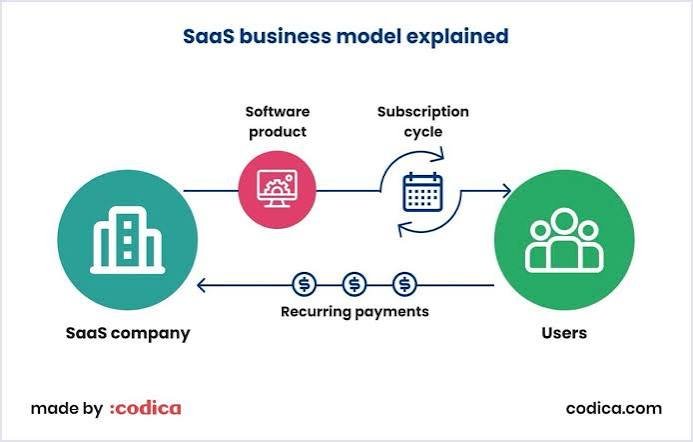
Software as a Service (SaaS) is a cloud-based software delivery model where users access applications through a web browser or mobile app instead of installing them on their own servers.
Typical characteristics of SaaS include:
- Cloud hosting
- Subscription-based pricing
- Automatic updates
- Multi-device access
- Scalable plans
- Built-in security features
- Collaboration capabilities
Why Businesses Use SaaS
Organizations adopt SaaS solutions because they provide several advantages.
Benefits include:
- Lower upfront costs
- Faster deployment
- Automatic updates
- Remote accessibility
- Easy collaboration
- Flexible scaling
- Reduced IT maintenance
- Integration with other business software
These advantages allow businesses to focus more on their core operations and less on infrastructure management.
Types of Business & SaaS Tools
Modern organizations often use multiple categories of software.
Customer Relationship Management (CRM)
CRM software helps businesses manage customer interactions throughout the sales and support lifecycle.
Common features include:
- Contact management
- Sales pipelines
- Lead tracking
- Email integration
- Customer history
- Reporting dashboards
- Workflow automation
Benefits:
- Better customer relationships
- Organized sales processes
- Improved forecasting
- Higher customer retention
Project Management Tools
Project management software keeps teams organized and aligned.
Features often include:
- Task assignment
- Deadlines
- Kanban boards
- Gantt charts
- Team collaboration
- File sharing
- Progress tracking
These tools help teams complete projects more efficiently and maintain visibility into ongoing work.
Communication Platforms
Effective communication is essential for modern businesses.
Communication software may provide:
- Team messaging
- Video conferencing
- Voice calls
- File sharing
- Channel-based discussions
- Screen sharing
Centralized communication reduces delays and improves collaboration.
Accounting & Finance Software
Financial management platforms help businesses monitor income, expenses, invoices, and cash flow.
Typical features include:
- Invoicing
- Expense tracking
- Financial reporting
- Tax preparation support
- Payroll integration
- Bank reconciliation
Automation reduces manual bookkeeping and improves financial accuracy.
Marketing Automation Platforms
Marketing software helps businesses attract, engage, and retain customers.
Capabilities often include:
- Email marketing
- Landing pages
- Campaign management
- Audience segmentation
- Customer journeys
- Lead nurturing
- Analytics
Automation saves time while supporting more consistent customer communication.
Customer Support Software
Customer service platforms improve how businesses respond to inquiries.
Features include:
- Ticket management
- Live chat
- Knowledge bases
- AI chat assistants
- Customer satisfaction surveys
- Help desk automation
High-quality support contributes to customer loyalty.
Human Resources (HR) Tools
HR software assists with workforce management.
Common functions include:
- Employee records
- Recruitment
- Performance reviews
- Leave management
- Payroll coordination
- Training management
Centralized HR systems simplify administrative tasks.
Cloud Storage & File Management
Cloud storage enables secure access to business files from multiple devices.
Advantages include:
- Secure backups
- File sharing
- Version history
- Team collaboration
- Access controls
- Disaster recovery support
Reliable cloud storage supports remote and hybrid work environments.
Business Intelligence & Analytics
Analytics platforms help organizations transform data into actionable insights.
Key capabilities include:
- Dashboards
- Reporting
- KPI monitoring
- Data visualization
- Forecasting
- Trend analysis
Data-driven decision-making helps businesses identify opportunities and address challenges more effectively.
AI-Powered Business Tools
Artificial intelligence is increasingly integrated into SaaS platforms.
AI features may include:
- Content generation
- Meeting summaries
- Predictive analytics
- Customer support automation
- Sales forecasting
- Workflow recommendations
- Document analysis
AI enhances productivity but should be used with appropriate human oversight.
Workflow Automation Tools
Automation platforms connect different applications and reduce repetitive work.
Common automation examples include:
- Creating tasks from emails
- Synchronizing customer information
- Sending notifications
- Updating spreadsheets
- Processing online forms
- Routing support tickets
Automation reduces errors and saves valuable time.
eCommerce Tools
Online businesses use specialized software for:
- Product management
- Inventory tracking
- Order processing
- Payment processing
- Shipping coordination
- Customer reviews
- Sales reporting
Integrated eCommerce systems simplify online operations.
Cybersecurity Tools
Business security platforms help protect digital assets.
Examples include:
- Password managers
- Endpoint protection
- Multi-Factor Authentication (MFA)
- Backup software
- Email security
- Network monitoring
- Vulnerability scanning
Strong cybersecurity is essential for businesses of every size.
How to Choose the Right SaaS Tools
Selecting software should begin with business needs rather than trends.
Consider the following:
Business Goals
Identify what challenges the software should solve.
Examples:
- Improve sales
- Reduce manual work
- Increase productivity
- Enhance collaboration
- Improve customer support
Ease of Use
Software should be intuitive for employees.
A complicated platform may reduce adoption and productivity.
Scalability
Choose tools that can support future growth without requiring a complete migration.
Security
Evaluate:
- Encryption
- MFA support
- Compliance certifications
- Access controls
- Backup capabilities
- Audit logs
Security should be a priority from the beginning.
Integrations
Business software should work well with existing systems.
Look for integrations with:
- CRM
- Accounting software
- Email services
- Calendar tools
- Payment platforms
- Marketing platforms
Integrated workflows reduce manual data entry.
Pricing
Compare:
- Monthly costs
- Annual plans
- User limits
- Feature availability
- Storage allowances
- Upgrade options
Consider total value rather than only the lowest price.
Setting Up a New SaaS Tool
Successful implementation involves several steps.
Step 1: Define Objectives
Determine the specific outcomes you want to achieve.
Step 2: Prepare Existing Data
Clean and organize customer, financial, or operational data before importing it into the new platform.
Step 3: Configure User Roles
Assign permissions based on employee responsibilities.
Limit administrator access where appropriate.
Step 4: Integrate Existing Systems
Connect the new platform with other business applications to create efficient workflows.
Step 5: Train Employees
Provide training sessions, documentation, and ongoing support.
Well-trained users are more likely to adopt new software successfully.
Step 6: Monitor Performance
Measure:
- Productivity improvements
- User adoption
- Workflow efficiency
- Return on investment (ROI)
Continuous evaluation helps optimize software usage.
Common Implementation Challenges
Organizations may encounter:
- Employee resistance
- Data migration issues
- Poor planning
- Inadequate training
- Integration difficulties
- Budget constraints
Addressing these challenges early improves long-term success.
SaaS Security Best Practices
Protect business data by:
- Enabling Multi-Factor Authentication
- Using strong passwords
- Reviewing user permissions regularly
- Monitoring login activity
- Backing up important information
- Updating connected applications
- Training employees on phishing awareness
Security is a shared responsibility between the software provider and the customer.
Measuring ROI
Evaluate software investments using metrics such as:
- Time saved
- Reduced operational costs
- Increased sales
- Customer satisfaction
- Employee productivity
- Error reduction
- Faster project completion
ROI assessments help determine whether a platform is delivering value.
Emerging Trends in Business SaaS
Several developments are shaping the future of business software.
AI-First Applications
AI is becoming a standard feature in productivity, customer service, analytics, and marketing tools.
Low-Code & No-Code Automation
Businesses can build workflows and applications with minimal programming experience.
Unified Workspaces
Organizations increasingly prefer platforms that combine messaging, documents, tasks, meetings, and AI assistance in one environment.
Industry-Specific SaaS
Vendors are creating software tailored to healthcare, education, manufacturing, legal services, retail, hospitality, and other industries.
Advanced Analytics
Modern platforms increasingly provide predictive insights rather than simply reporting historical data.
Best Practices for Long-Term Success
To maximize value from SaaS tools:
- Choose software that aligns with business goals.
- Avoid paying for unnecessary features.
- Review subscriptions periodically.
- Train employees regularly.
- Monitor security settings.
- Keep integrations updated.
- Measure performance and ROI.
- Stay informed about new capabilities.
Business & SaaS Tools Checklist
Before adopting a new platform, confirm that you have:
- ✅ Clearly defined business objectives.
- ✅ Compared features and pricing.
- ✅ Evaluated security controls.
- ✅ Planned data migration.
- ✅ Configured user permissions.
- ✅ Tested integrations.
- ✅ Trained employees.
- ✅ Established backup procedures.
- ✅ Defined success metrics.
- ✅ Scheduled periodic software reviews.
Conclusion
Business and SaaS tools have transformed the way organizations operate by making powerful software accessible through the cloud. From CRM systems and project management platforms to AI-powered assistants and workflow automation, these tools enable businesses to work more efficiently, collaborate effectively, and respond quickly to changing market demands.
The most successful software implementations begin with a clear understanding of business objectives, followed by careful evaluation of usability, security, scalability, and integration capabilities. Ongoing employee training, regular performance reviews, and strong cybersecurity practices ensure that organizations continue to benefit from their technology investments.
As artificial intelligence, automation, and cloud technologies continue to evolve, SaaS platforms will become even more intelligent, connected, and personalized. Businesses that embrace these innovations thoughtfully will be better equipped to improve productivity, enhance customer experiences, and achieve sustainable growth.
Frequently Asked Questions (FAQs)
1. What is a SaaS tool?
A SaaS (Software as a Service) tool is cloud-based software that users access through the internet, typically via a subscription, without needing to install or maintain it on their own servers.
2. Why do businesses prefer SaaS over traditional software?
SaaS offers lower upfront costs, automatic updates, remote access, scalability, easier collaboration, and reduced IT maintenance compared to traditional on-premises software.
3. What types of business functions can SaaS tools support?
SaaS tools can support customer relationship management, project management, accounting, marketing, customer support, HR, communication, analytics, workflow automation, cybersecurity, and eCommerce operations.
4. How can businesses choose the right SaaS platform?
Organizations should evaluate business needs, usability, security, integration capabilities, scalability, vendor support, and overall value before selecting a platform.
5. Are SaaS tools secure?
Most reputable SaaS providers implement strong security measures such as encryption, access controls, and regular updates. Businesses should also enable MFA, manage user permissions carefully, and train employees on cybersecurity best practices.


