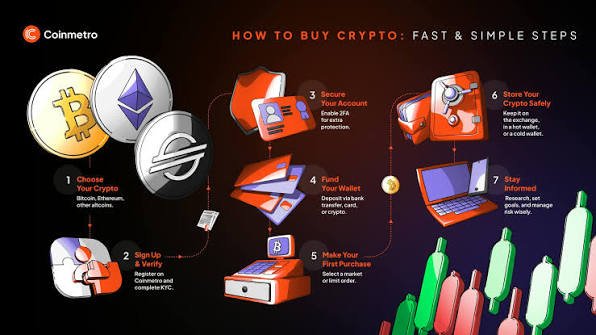
Cryptocurrency has become one of the fastest-growing areas of digital finance, offering people the ability to own, send, receive, and manage digital assets without relying on traditional financial institutions. Whether you’re interested in Bitcoin (BTC), Ethereum (ETH), Solana (SOL), stablecoins, or other cryptocurrencies, the first step toward participating in the crypto ecosystem is setting up a secure cryptocurrency wallet.
A crypto wallet does not actually store your cryptocurrency. Instead, it stores the cryptographic credentials that allow you to access and manage assets recorded on a blockchain. Understanding how wallets work, how to secure them, and how to use them responsibly is essential for protecting your investments and avoiding costly mistakes.
This comprehensive tutorial explains everything beginners need to know about cryptocurrency wallets, including wallet types, setup steps, security best practices, common errors, and practical tips for using wallets safely.
What Is a Cryptocurrency Wallet?
A cryptocurrency wallet is a software application or physical device that allows users to interact with blockchain networks.
A wallet enables you to:
- Send cryptocurrency
- Receive cryptocurrency
- View balances
- Sign blockchain transactions
- Connect to decentralized applications (dApps)
- Manage multiple digital assets
Your wallet provides access to your blockchain addresses through cryptographic keys.
How Crypto Wallets Work
Your cryptocurrency exists on the blockchain—not inside your wallet.
The wallet stores and manages:
- Private keys
- Public keys
- Wallet addresses
- Transaction history
- Network settings
The blockchain records ownership, while your wallet allows you to prove ownership through cryptographic signatures.
Understanding Public and Private Keys
Public Key
The public key helps generate your wallet address.
You can safely share your wallet address with others so they can send cryptocurrency to you.
Private Key
The private key proves ownership of your cryptocurrency.
Anyone who gains access to your private key may be able to control your funds.
Never share your private key with anyone.
Recovery (Seed) Phrase
Most wallets generate a recovery phrase during setup.
This phrase:
- Restores wallet access
- Protects against device failure
- Must remain private
- Should be backed up securely
Never store your recovery phrase in publicly accessible locations or share it with anyone.
Types of Crypto Wallets
Hot Wallets
Hot wallets remain connected to the internet.
Examples include:
- Mobile wallets
- Desktop wallets
- Browser extension wallets
- Web wallets
Advantages
- Convenient
- Easy to access
- Suitable for daily transactions
Considerations
Because they are internet-connected, they require careful security practices.
Cold Wallets
Cold wallets store cryptographic credentials offline.
Examples include:
- Hardware wallets
- Paper backups of recovery phrases (handled securely)
Advantages
- Reduced exposure to online threats
- Well suited for long-term storage
Considerations
Cold wallets require responsible backup and physical protection.
Custodial vs. Self-Custody Wallets
Custodial Wallets
A third party manages your cryptographic keys.
Advantages include:
- Simpler recovery
- User-friendly experience
Trade-offs include relying on the service provider’s security and policies.
Self-Custody Wallets
You control your own private keys and recovery phrase.
Advantages include:
- Greater control
- Direct ownership
- Independence from third parties
With this control comes greater responsibility for safeguarding access credentials.
Before You Create a Wallet
Prepare by:
- Using a trusted device
- Updating your operating system
- Enabling device security
- Ensuring you have a safe place to store your recovery phrase
- Downloading wallet software only from official sources
Preparation helps reduce security risks.
Step-by-Step Wallet Setup
Step 1: Choose a Wallet
Consider:
- Supported cryptocurrencies
- Security features
- Ease of use
- Compatibility with your devices
- Reputation
- Backup options
Choose a wallet that matches your intended use and experience level.
Step 2: Install the Wallet
Download the application from its official website or trusted app store.
Avoid downloading wallets from unknown links or unofficial sources.
Step 3: Create a New Wallet
Follow the wallet’s setup instructions.
The wallet will generate:
- A new wallet address
- Cryptographic keys
- A recovery phrase
Read each instruction carefully before continuing.
Step 4: Write Down the Recovery Phrase
Record your recovery phrase carefully.
Best practices include:
- Writing it clearly by hand or using another secure offline method.
- Verifying every word and its order.
- Keeping multiple secure backups if appropriate.
- Storing backups in separate secure locations.
Never send your recovery phrase through email, messaging apps, or social media.
Step 5: Verify the Recovery Phrase
Many wallets ask you to confirm the phrase during setup.
This verification helps ensure your backup is accurate.
Do not skip this step.
Step 6: Secure Your Wallet
Enable available protections such as:
- Strong password
- Device PIN
- Biometric authentication (where available)
- Auto-lock features
Security layers help protect your wallet from unauthorized access.
Understanding Wallet Addresses
Each wallet can generate one or more public addresses.
Wallet addresses:
- Receive cryptocurrency
- Are safe to share
- Differ by blockchain network
Always verify that the sender is using the correct blockchain network for your address.
Receiving Cryptocurrency
To receive crypto:
- Open your wallet.
- Select the cryptocurrency.
- Copy your wallet address or display its QR code.
- Share the address with the sender.
- Confirm the correct blockchain network is being used.
Once the transaction is confirmed on the blockchain, your balance should update.
Sending Cryptocurrency
Before sending funds:
- Verify the recipient’s address carefully.
- Confirm the correct blockchain network.
- Review transaction fees.
- Double-check the amount.
- Consider sending a small test transaction first when appropriate.
Blockchain transactions are generally irreversible once confirmed.
Understanding Transaction Fees
Most blockchain networks charge transaction fees.
Fees help:
- Process transactions
- Secure the network
- Prioritize confirmations during busy periods
Fees vary depending on network congestion and the blockchain being used.
Connecting Wallets to dApps
Many wallets allow users to connect to decentralized applications.
Examples include:
- Decentralized exchanges
- NFT marketplaces
- Blockchain games
- DeFi platforms
Before connecting:
- Verify the website.
- Understand requested permissions.
- Disconnect when finished if appropriate.
- Review wallet permissions periodically.
Essential Security Best Practices
Protect your wallet by:
- Keeping your recovery phrase private.
- Never sharing private keys.
- Using strong passwords.
- Updating wallet software.
- Avoiding suspicious links.
- Verifying website addresses.
- Using trusted devices.
- Monitoring account activity.
Security is an ongoing process.
Common Wallet Mistakes
Avoid these common errors:
Sharing Recovery Phrases
No legitimate wallet provider or customer support representative should ask for your recovery phrase.
Downloading Fake Wallet Apps
Always verify the official developer before installing any wallet application.
Sending Crypto to the Wrong Network
Different blockchains may use different address formats and networks.
Always confirm compatibility before sending funds.
Ignoring Security Updates
Wallet developers regularly release updates that improve security and stability.
Keep your software current.
Rushing Transactions
Take time to review:
- Recipient address
- Network
- Amount
- Fees
Careful verification can prevent irreversible mistakes.
Wallet Backups
A proper backup helps protect against:
- Device loss
- Hardware failure
- Theft
- Accidental deletion
Review your backup strategy periodically to ensure recovery information remains accurate and accessible.
Device Security
Protect the devices you use for cryptocurrency by:
- Installing operating system updates.
- Enabling screen locks.
- Using antivirus or endpoint protection where appropriate.
- Avoiding unknown software.
- Encrypting devices if supported.
Your wallet is only as secure as the device that accesses it.
Recognizing Wallet Scams
Be cautious if someone:
- Requests your recovery phrase.
- Promises guaranteed crypto profits.
- Sends unexpected wallet connection requests.
- Encourages urgent transfers.
- Claims to double your cryptocurrency.
Scammers frequently rely on urgency and impersonation.
Troubleshooting Common Issues
Transaction Pending
Possible causes include:
- Network congestion
- Low transaction fees
- Blockchain delays
Most pending transactions resolve once the network processes them.
Incorrect Address
Blockchain transactions are generally irreversible.
Always verify recipient information before sending.
Lost Device
If you have your recovery phrase, you can usually restore access by importing it into a compatible wallet.
Forgotten Password
Many wallets allow recovery using the recovery phrase, depending on the wallet design.
Protect your recovery phrase carefully.
Future of Crypto Wallets
Wallet technology continues to evolve with features such as:
- Passkey authentication
- Biometric security
- Improved phishing protection
- Transaction simulation
- Enhanced user interfaces
- AI-assisted fraud detection
- Multi-chain asset management
These improvements aim to make cryptocurrency safer and more accessible.
Crypto Wallet Setup Checklist
Before using your wallet, ensure that you:
- ✅ Downloaded it from an official source.
- ✅ Created a secure password.
- ✅ Backed up your recovery phrase offline.
- ✅ Verified your recovery phrase.
- ✅ Enabled available security features.
- ✅ Confirmed wallet addresses carefully.
- ✅ Understood transaction fees.
- ✅ Verified blockchain networks before transfers.
- ✅ Updated your wallet software.
- ✅ Avoided sharing sensitive information.
Conclusion
Setting up a cryptocurrency wallet is the foundation of participating safely in the world of digital assets. While the process is generally straightforward, protecting your private keys and recovery phrase is essential because these credentials represent access to your funds.
By understanding how wallets work, choosing the right type of wallet for your needs, following strong security practices, and carefully reviewing every transaction, you can significantly reduce the risk of theft or accidental loss. As the cryptocurrency ecosystem continues to grow, responsible wallet management, continuous learning, and cybersecurity awareness will remain key to safeguarding your digital assets.
Whether you’re buying your first cryptocurrency, exploring decentralized finance, or collecting digital assets, a secure wallet setup provides the confidence needed to navigate the blockchain ecosystem responsibly.
Frequently Asked Questions (FAQs)
1. What is a crypto wallet?
A cryptocurrency wallet is a software application or hardware device that manages the cryptographic keys needed to access and control digital assets recorded on a blockchain.
2. Do crypto wallets actually store cryptocurrency?
No. Cryptocurrency remains on the blockchain. The wallet stores the cryptographic credentials that allow you to access and manage your blockchain addresses.
3. What is the difference between a hot wallet and a cold wallet?
A hot wallet is connected to the internet and is convenient for frequent transactions, while a cold wallet stores credentials offline, reducing exposure to online threats and making it well suited for long-term storage.
4. What is a recovery phrase?
A recovery (seed) phrase is a series of words generated when creating a wallet. It allows you to restore access if your device is lost or damaged and should always be kept private and securely backed up.
5. What is the most important wallet security rule?
Never share your private keys or recovery phrase. Anyone with access to them may be able to control your cryptocurrency.